🛡️ ReturnShield

Built for Amazon FBA sellers

See which FBA returns are worth filing before you open Seller Central.

ReturnShield reads official returns and reimbursements reports, drops what Amazon already paid, and orders the rest by review date. You copy the case packet and file it yourself. One approved reimbursement over $20 covers the month.

14-day free trial · $20/mo Pro · No card required · Renews via Stripe when subscribed
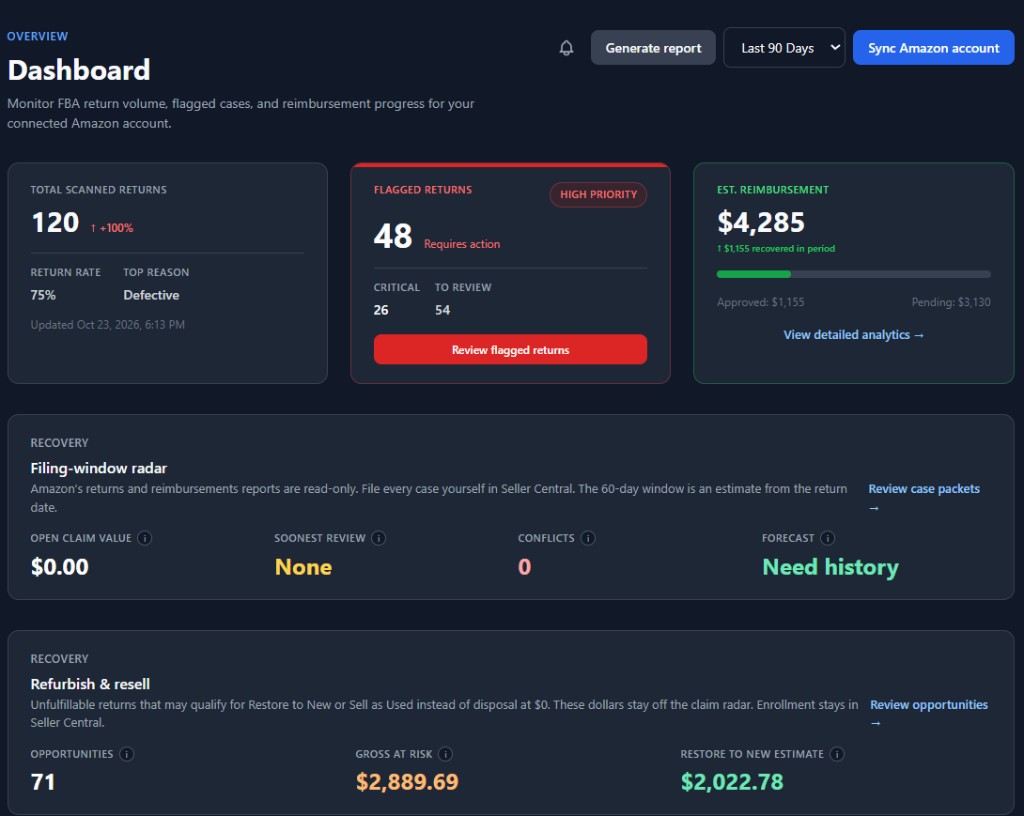
ReturnShield dashboard showing scanned returns, estimated reimbursement, the filing-window radar, and the refurbish and resell strip

Why ReturnShield

Everything you need to protect FBA margins

A read-only recovery desk for FBA sellers: reimbursement matching, a filing-window radar, case packets, and a refurbish and resell list.

FBA returns sync

Import the official returns and reimbursements reports when you sync, or turn on an optional daily pull. The pull does not file a case.

Reimbursement recovery

Paid reimbursements leave the open queue. Copy a case packet for what is still unmatched, then file that case yourself in Seller Central.

Refurbish & resell

Customer-damaged units can be screened for Restore to New or Sell as Used, instead of disposal at $0. Defective units stay on the claim list. Enrollment stays in Seller Central.

Return intelligence

File the claim, or recover the unit

The filing-window radar sorts defective and carrier-damage claims by the estimated review date. Customer-damaged units move to a separate resell list, so those dollars are not counted twice.
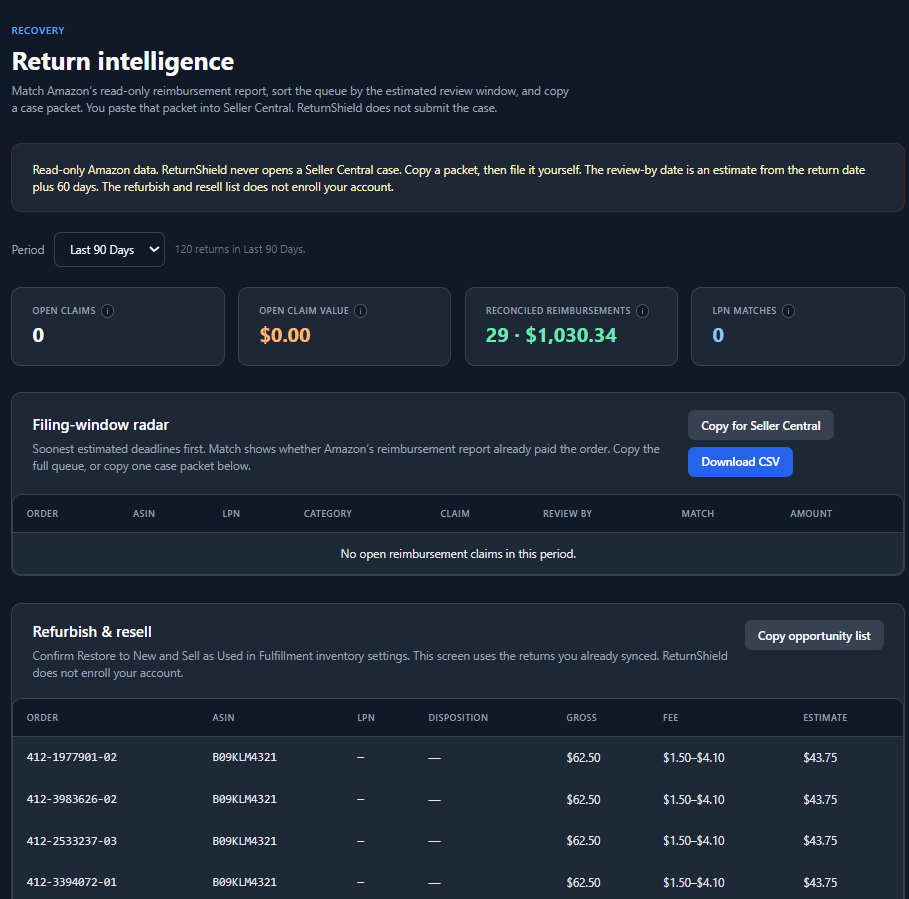
  • Reimbursement match shows paid, partial, or still open
  • Case packets copy into the Seller Central case you open
  • Restore to New estimate is about 70% of gross, with a $1.50–$4.10 fee after a successful relist
ReturnShield return intelligence showing the read-only notice, filing-window radar, and refurbish and resell opportunity list

Advanced analytics

See financial exposure and recovery performance at a glance

Track at-risk dollars, recovered reimbursements, and worksheet outcomes for the period you select. Payment matches, the filing-window radar, and case packets live in Return intelligence.
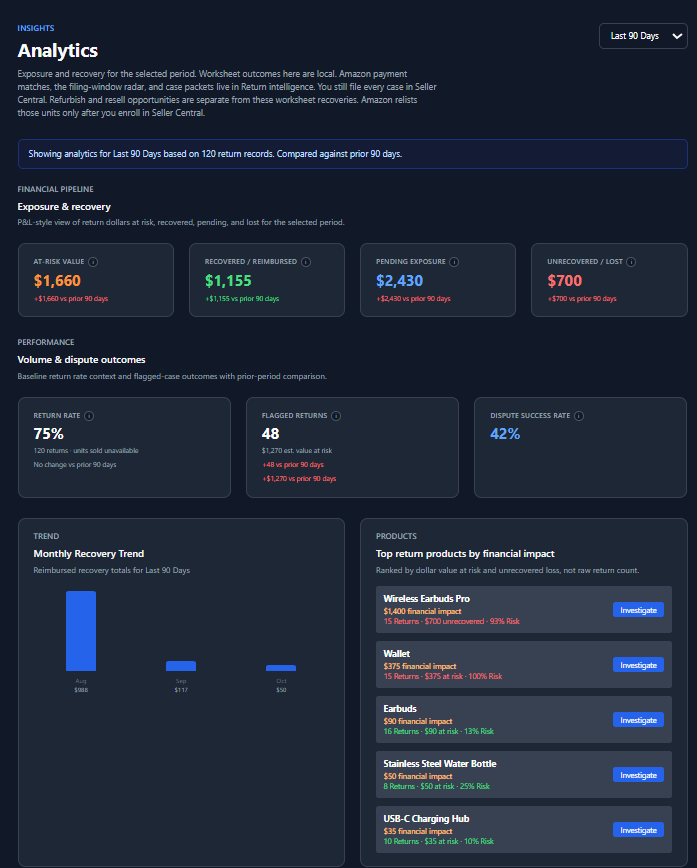
  • Exposure and recovery pipeline with period-over-period comparisons
  • Return rate, flagged volume, and local worksheet outcomes
  • Reports you export from the dashboard and file yourself
ReturnShield analytics showing exposure and recovery, volume outcomes, the monthly recovery trend, and top return products

Simple setup

How ReturnShield works

Go from signup to recovered revenue in three straightforward steps—no complex onboarding required.

Connect Amazon

Link your seller account with Login with Amazon. Sync reads the official returns and reimbursements reports. An optional daily pull uses the same reports and does not file a case.

Monitor Returns

Review imported returns in the log, then open Return intelligence for deadlines, disposition conflicts, and resell opportunities.

Recover Revenue

Copy a case packet and file it yourself in Seller Central, or review the resell list and enroll in Fulfillment inventory settings if you choose.

Step 1 · Connect Amazon

Link your seller account in minutes

Connect with Login with Amazon. The integration reads returns and reimbursements only. Daily report pull and the refurbish answers are saved in ReturnShield. They do not enroll your account or open a case.
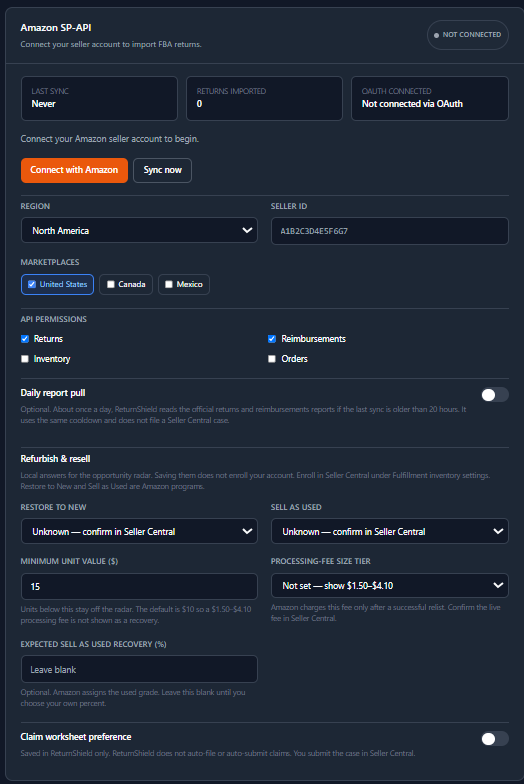
  • Secure OAuth connection, with a visible sync status
  • Optional daily report pull when the last sync is older than 20 hours
  • Local Restore to New and Sell as Used answers for the opportunity radar
ReturnShield Amazon settings showing connection status, daily report pull, local Restore to New and Sell as Used answers, and the claim worksheet preference

Step 2 · Monitor returns

Every FBA return, searchable and actionable

Review imported FBA returns in a filterable log. Search by order ID or ASIN, narrow by period and status, and open a return when you need the evidence gallery.
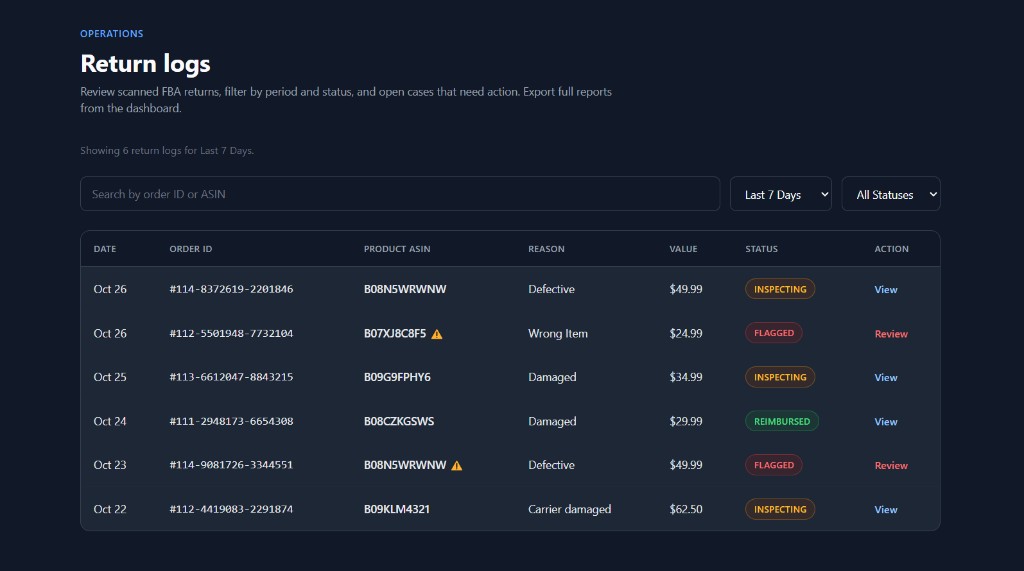
  • Filter by period and status to focus on what matters
  • Flagged returns highlighted for review
  • Open an order to review details and evidence
ReturnShield return logs showing search, period and status filters, and six FBA returns with inspecting, flagged, and reimbursed statuses

Step 3 · Review the order

Open the return, then file it yourself

Each return opens into an order review. Buyer name and address are not collected. You can add evidence, mark the return on your claim worksheet, and record a reimbursement in ReturnShield. Seller Central is where you submit the case.
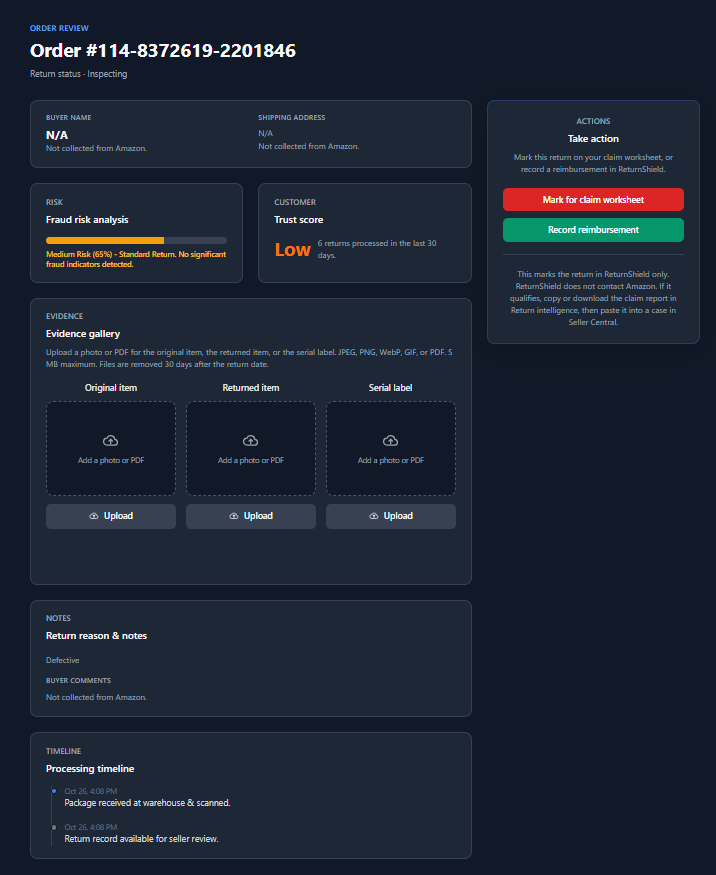
  • Evidence gallery for the original item, the returned item, and the serial label
  • Worksheet actions stay in ReturnShield and do not contact Amazon
  • A processing timeline for the scan and the seller review
ReturnShield order review showing buyer fields not collected, fraud risk, trust score, evidence gallery, claim worksheet actions, and the processing timeline

Simple pricing

One plan. Full access.

Try everything free for 14 days with no credit card. Subscribe to Pro only when you choose—paid plans bill through Stripe and renew monthly unless canceled.

ReturnShield Pro

$0 first 14 days
$20 / month if you subscribe

$20 a month. One paid claim over $20 covers it. ReturnShield puts unpaid, in-window claims in order and writes the packet. You paste it into the Seller Central case you open. Amazon decides whether it pays.

Start with a 14-day free trial with full access. No credit card is required, and you are not charged during the trial.

If you subscribe to Pro ($20/month), you authorize Comrade Enterprises LLC and Stripe to charge applicable fees. Subscriptions renew automatically each billing period unless you cancel before the renewal date. Cancel anytime—you keep full access through the end of your current paid period. See our Terms of Service for details.

  • Read-only returns and reimbursements sync
  • Filing-window radar and case packets
  • Refurbish and resell opportunity list
  • Optional daily report pull
  • You file every Seller Central case yourself
Start 14-day free trial

No card for trial · Stripe billing when you subscribe · Auto-renews until canceled

FAQ

Frequently asked questions

Common questions about FBA returns, reimbursements, and how ReturnShield protects your data.

Because the filing is the last minute, not the work. ReturnShield reads Amazon's FBA returns and reimbursements reports, removes claims that are already paid, and sorts what is left by review date. Defective and carrier-damaged units stay on the claim list. Customer-damaged units go to a resell list, so you do not file those by mistake or throw away a unit that could be relisted. You copy a packet into the Seller Central case you open.

Pro is $20 a month. One approved reimbursement above $20 covers that fee. Amazon decides whether the claim is paid. ReturnShield does not file it for you, and it does not promise a payout. Automated filing would be faster to click and worse to own: a bot can submit a case you did not check. Here, you remain the one who submits.

When you run a sync, or turn on the optional daily report pull, ReturnShield reads the FBA customer returns report and the FBA reimbursements report. It stores order ID, SKU, ASIN, product name, return date, reason, status, disposition, quantity, fulfillment-center ID, license plate number, and reimbursement amount. It does not collect buyer name, email, address, or comments, and it does not file the Seller Central case.
It screens customer-damaged and damaged units that came back in a physical quantity and are still unpaid. Defective and carrier-damaged units stay on the filing-window radar. The Restore to New figure is about 70% of gross, Amazon’s published average on eligible units, and the processing fee is shown as $1.50–$4.10 until you set a size tier. Saving your enrollment answer does not enroll the account. You confirm Restore to New and Sell as Used in Seller Central.
ReturnShield prepares a CSV worksheet from return rows that match common reimbursement reasons. You file that worksheet yourself in Seller Central. Amazon decides whether a reimbursement is paid.
ReturnShield is operated by Comrade Enterprises LLC and hosted on secure cloud infrastructure (Firebase). Data is transmitted over HTTPS, access is authenticated, and payments are processed by Stripe—we never store full card numbers. See our Privacy Policy for full details.
No credit card is required to begin your 14-day trial, and you will not be charged during the trial. After the trial, you can choose whether to subscribe to Pro for $20/month. Subscribing is optional—you decide if and when to upgrade.
When you subscribe to Pro, payments are processed securely by Stripe—we never store full card numbers. Your subscription renews automatically each billing period unless you cancel before the renewal date. If you cancel, you keep full Pro access until the end of your current paid period. Fees are non-refundable except where required by law. Manage billing anytime in Settings. See our Terms of Service (Section 5) for full billing terms.
No. ReturnShield is an independent product of Comrade Enterprises LLC and is not affiliated with, endorsed by, or sponsored by Amazon.com, Inc. or its affiliates.

Ready to secure your FBA revenue?

Start the 14-day trial and see the filing window, the case packets, and the units that may be worth relisting.